variable
# assignment str"v" to name "variable"
## "" and unquote str and variable
variable <- "v"
Variable <- 1

variable +1
Variable +1 Week1: R studio, vector and function
R-project
data type
vector
Github
function
Welcome to the first course! During the following 2 hrs, you will learn data type of vectors, function and %>%.
Note
- set up Rstudio, Github, and name space
- vector and 3 basic data types: (“chr”,“numeric”,“Date”)
- functions, documentation and data type check
- meaning of
%>%and.
1 Set up your working directory
1.1 preparation
- Please make sure you have installed
R & Rstudio.
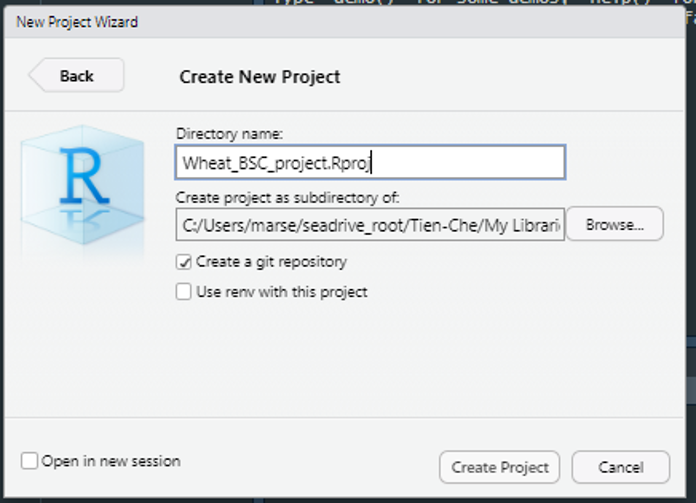
- Open Rstudio, File -> New Project ->
Wheat_BSC_project, clickcreate a git repository - download the data from HU-box, save it in
data. - create Week1.R and save it in folder
src. - Open
github desktop
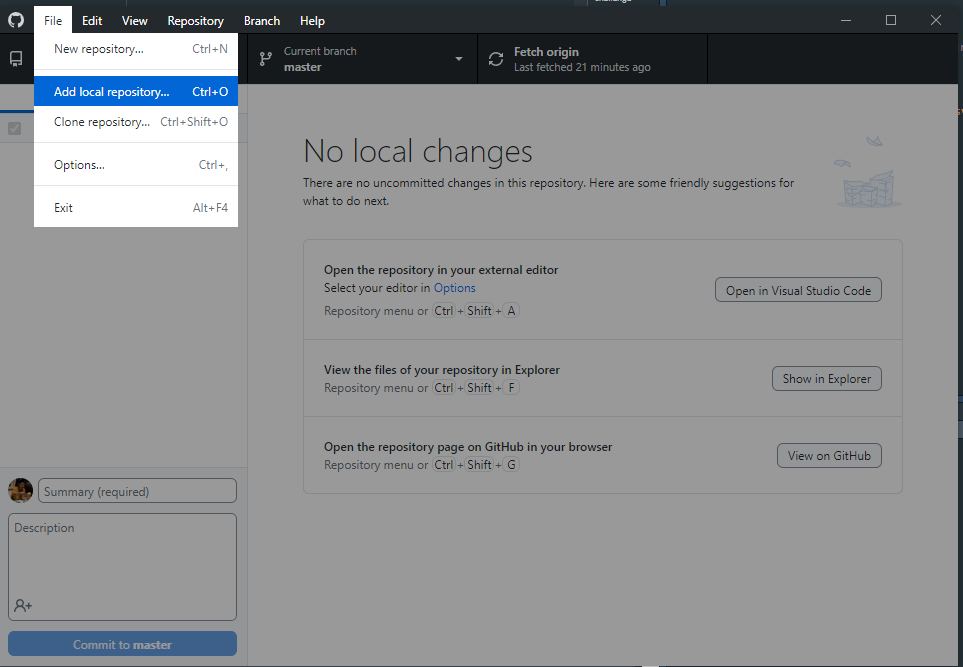
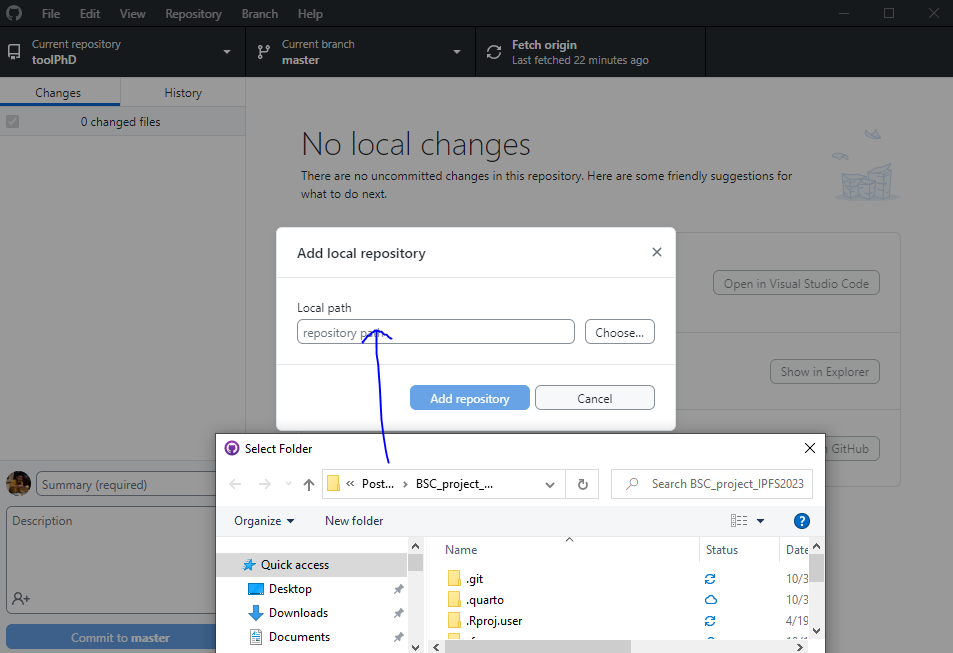
- comment&commit & push
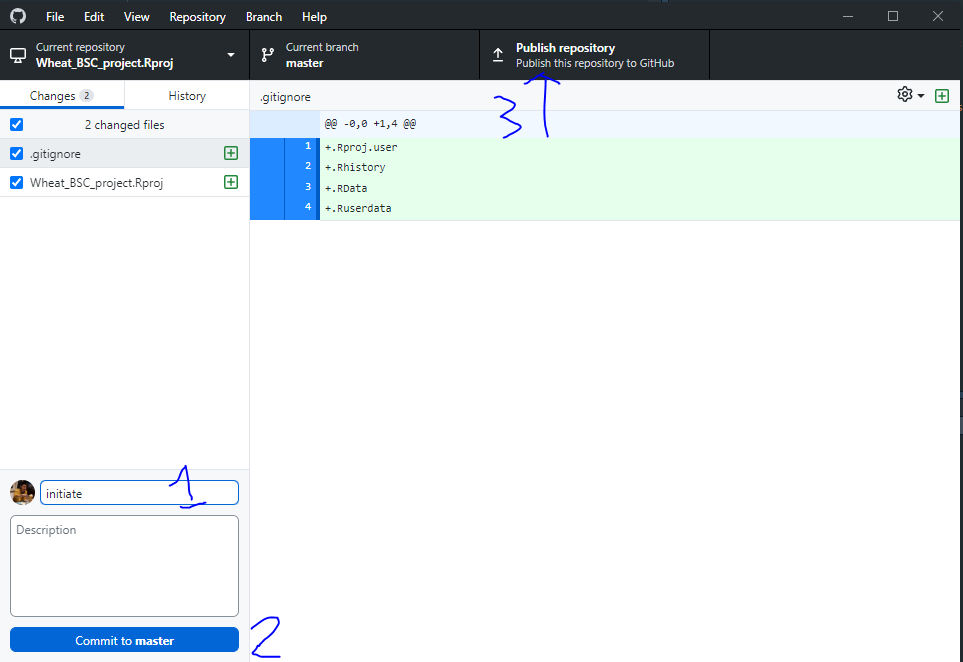
- Press
Ctrl+ Shift +Nto open new script. - Save it as
Week1.RCopy code from this website to your script and pressrun.
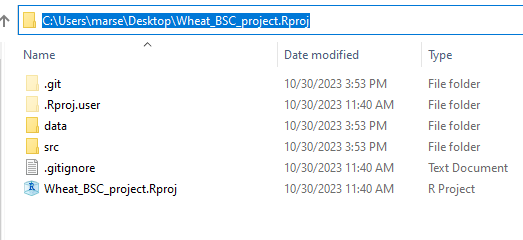
1.2 Concept of datatype & name space:
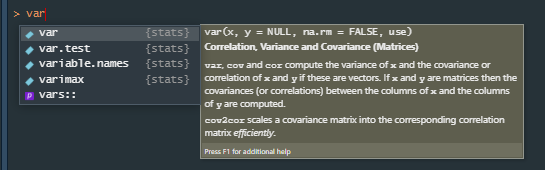
Don’t overwrite
variable namesin name space (what already exists in system).- eg.,
var,mean,aov, etc.
- eg.,
Warning
avoid something that will show in the drop down menu of auto-completion.
Separate long
variable nameswith_.- eg.,
thermal_time,mean_yield, etc.
- eg.,
Don’t start
variable nameswith number.
| Bad | Better | |
|---|---|---|
3years |
three_years |
|
1225measurement |
measurement_1225 |
|
13genotypes |
genotypes_13 |
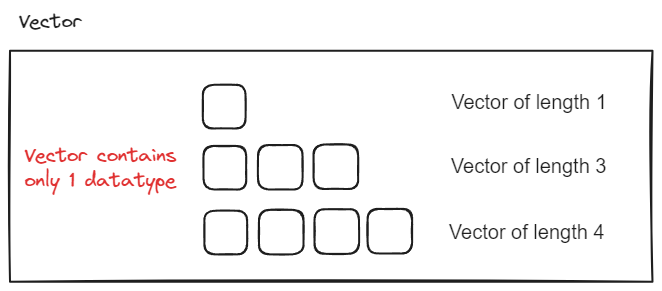
Variable = variable names + object 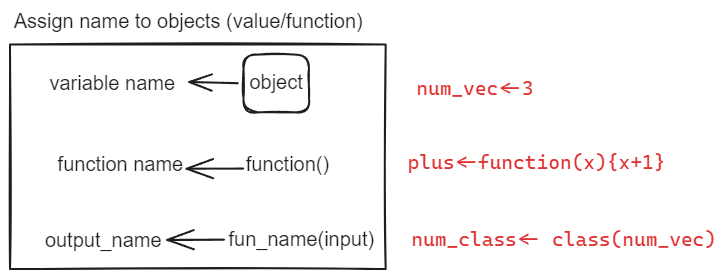
2 Data type is everything
2.1 Always check your data type first!
# str??
str
?str
str(variable)
str(Variable)
# data type coersion
str(NA)
str(c(NA,1))
str(c(NA,"a"))
str(c(NA,TRUE))
str(c(1,"a"))
2.2 Date
as.Date("2023-04-17")
as.Date("2023-04-17",format="%Y-%m-%d")
# is ther any error?
as.Date("20230417")
as.Date("17042023")
# additive properties of Date
as.Date("2023-04-17")-7
as.Date("2023-04-17")+2
3 Function: something ends with ()
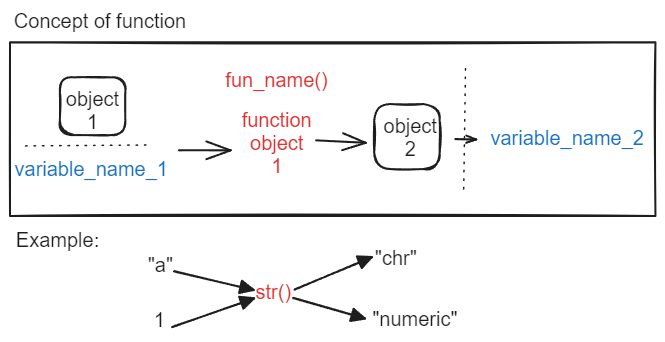
# example: fun(object)
c(1,2,3)
seq(1,3,1)

mean(c(1,2,3))
str(TRUE)
3.1 r packages : collection of functions
Check this great package tidyverse!
- Note that windows user may need to first download the Rtools that match your R version.
You can check your R version by typing version() in your R console.
install.packages(dplyr)
install.packages("dplyr")
library(dplyr)
3.2 separate individual function from nested functions with %>%
Pipe (%>%) is available in r-package either dplyr or magrittr.
Please use %>% to avoid embedded functions.
.stands for the result from the left side of the pipe.
For long line code, press enter after each %>%.
Select all the codes by ctrl A.
Indent the selected codes by ctrl I.
Concepts of using pipe
# syntax of using pipe
library(dplyr)

fun1(object)
# .= object
object %>% fun1(.)
# . could be also skipped
object %>% fun1()

# . = fun1(object)
object %>% fun1() %>% .
object %>% fun1(.) %>% .

#embedded functions
fun2(fun1(object))
# .=fun2(fun1(object))
object %>%
  fun1() %>%
  fun2() %>% .
Examples of using pipe
# how many ways of creating a sequence?
c(1,2,3)
seq(1,3,1)

# embedded function : fun2(fun1())
length(c(1,2,3))
# use pipe, "." is the result of previous step
c(1,2,3) %>% length(.)

# replicate element as vector
rep(1,3)
# remove duplicates
rep(1,3) %>% unique()
# cumulative sum
rep(1,3) %>% cumsum()

# is there any difference?
paste(c("a","1"),collapse = "")
paste0(c("a","1"))
paste0("a","1")
challenge
We introduced data type Date in Section 2.2, It actually behave like numeric sequence. You have Vector of type date, length is 1, value is “2023-04-17”.
date_element <- as.Date('2023-04-17')- How to create
datevector of length 5?
[1] "2023-04-17" "2023-04-18" "2023-04-19" "2023-04-20" "2023-04-21"- Could you do the average of this vector?
challenge
Use str() to check the data type of variable in your environment.
You have two vectors,
vec1<-c("a","b")
vec2<-c("1","2")
How to use paste and repto create sequence of char vector shown below?
[1] "a1" "a2" "b1" "b2"[1] "a1" "b1" "a2" "b2"Check the arguments of rep to get more hints.
?repe.g.,
rep(c("a","b"),each=2)rep(c("a","b"),times=2)
3.3 write your first function
format: function_name(argument1, argument2) {code} example:
plusone <- function(x){
  x+1
}
# is function data type sensitive?
plusone(variable)
plusone(Variable)
function with good documentation example:
function_name  <-function(input){
  # input: datatype, length, meaning.
  # output: datatype, length, meaning.
  # action1: intermediate_variable <- input %>% fun1()
  # action2: output <-intermediate_variable%>% fun2()
  ...
  return(output)
}
challenge
write a function with documentation: input vec is a numeric vector with length 3, return str of average value of vec ± standard deviation of vec.
Visualize the step in your function by first writing your the possible steps in text!